/ Products · Chrome extension
Jira Cloud’s new navigation shows project names and leaves out the keys. If your team talks in keys (MKTG-42, OPS-7), every jump between projects starts with a guess.
Install the extension and the key sits next to the name again, everywhere the new navigation dropped it.
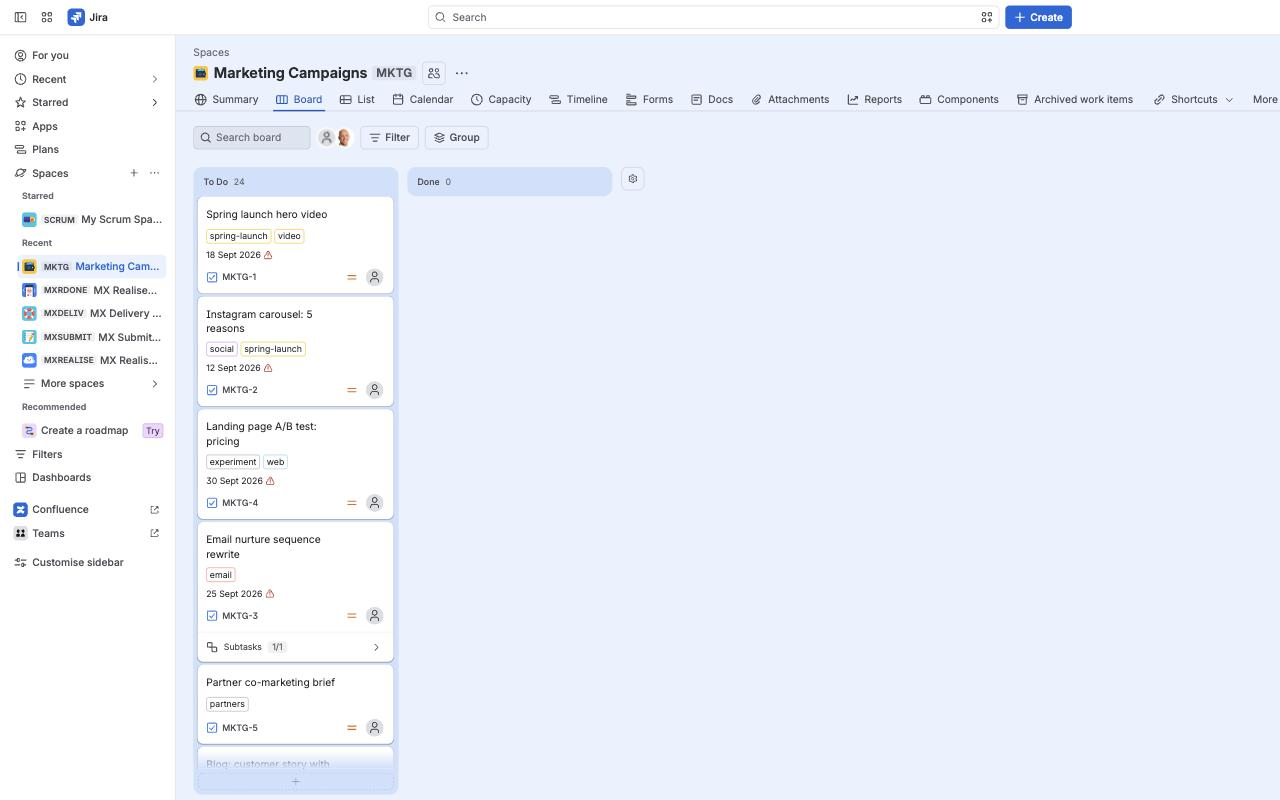
The key in front of every project in the sidebar, so long names that get cut off still show it.
The key after the project name in the space header.
Keys in the More spaces flyout.
Keys in the breadcrumb on work items and service project pages.
Keys in issue search’s Space filter, archived projects included.
Software, business and service projects alike.
Forge apps can’t change how Jira draws its own navigation, so this is a Chrome extension. It reads each key from the links and the address already on the page and adds a small grey badge.
Places that already show keys are left alone: the Spaces directory, Manage spaces and the Create dialog.
Runs only on your Atlassian site. No Softwired account. Nothing is sent to our servers. To label the Space filter, it reads your own site’s project list at most once every 12 hours and keeps it in your browser.
Free. Version 1.3.3, a 16 KB zip.
To update, replace the folder with the new version and press the reload icon on the extension’s card.
Published by Softwired Digital Pty Ltd, Brisbane.